

PC (short for personal computer) is one of the most influential inventions of the 21st century, profoundly impacting modern life—from daily work to leisure activities. As computers become indispensable, the demand for high-quality peripherals, especially mechanical keyboards, continues to grow.
While many users pursue a comfortable typing experience with mechanical keyboards, office workers and students often prioritize silence as their core need. Imagine typing on a loud mechanical keyboard in a quiet café or office—it’s likely to disturb those around you. A mechanical keyboard that balances excellent typing feel with silent operation is what many people are looking for. However, due to technical limitations, there’s no switch that achieves both "perfect typing experience" and "complete silence." Most popular switches aren’t designed for quiet use, so users need to specifically choose switches optimized for silence.

This article will introduce you to silent switches—explaining what they are, how they work, how to choose the right one, and finally, recommending mechanical keyboards pre-installed with high-quality silent switches.
What is a Silent Switch?
First, let’s clarify a common misunderstanding: "silent switches" aren’t completely noiseless. The silent switches available today don’t eliminate sound entirely—instead, they significantly reduce overall noise output to a non-disturbing level.
Silent switches reduce noise through a dampening mechanism: rubber pads are installed on the switch stem. When you fully press a keycap, the rubber pads absorb the impact force, minimizing the "bottom-out" noise. They also perform the same function when the key rebounds, reducing "upstroke" noise.
You may have heard of popular silent switches like Cherry MX Silent Red, Seasalt Silent Switches, or Kailh Midnight Pro Silent Switches. If you’re wondering why you need a silent switch, let’s explore their key benefits.
Benefits of Using Silent Switches
1. Non-disturbing for others: Silent switches are ideal for quiet environments like offices, libraries, cafes, or late-night use at home. Unlike standard linear or tactile switches, they won’t disrupt colleagues, classmates, or family members with loud typing noise.
2. Balances feel and quietness: While no silent switch is perfectly silent and perfectly tactile, modern designs prioritize both low noise and a satisfying typing experience. This makes them great for gamers who want to focus on in-game audio without sacrificing responsive key feedback.

How Do Silent Switches Reduce Noise?
The most common and effective method for silent switches is adding damping pads to the switch stem. These pads absorb impact during key presses and rebounds, directly reducing noise. This design is widely used in the industry and works well for noise reduction.
However, as user demands for mechanical keyboards rise, some drawbacks of basic damping pads have emerged—for example, some switches feel "soft" or mushy because the pads absorb too much of the typing force. Fortunately, not all silent switches have this issue. Take the RK Misty Purple Switch, for instance—it maintains a crisp typing feel while keeping noise to a minimum.

Since most silent switches share a similar basic structure, we recommend researching thoroughly before buying—watch review videos, read user feedback, or try a switch tester to ensure the feel meets your expectations.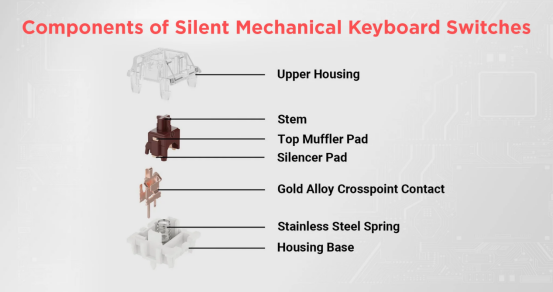
How to Choose the Right Silent Switch for You?
- Consider your usage environment: Are you using the keyboard in a quiet office/library, or a more casual space? Different environments require different noise levels—for example, a library may need ultra-silent switches, while a home office can tolerate slightly more sound.
- Choose the right switch type: Silent switches come in two main types—silent linear (smooth, no tactile bump) and silent tactile (subtle feedback when pressing). If you prefer a smooth typing experience, go for linear; if you want gentle tactile feedback, choose tactile.
- Stick to your budget: There are silent switches at various price points from different brands. Balance your needs (noise reduction, typing feel) with your budget to find the best option.
- Check user reviews and try before buying: User reviews reveal real-world performance (e.g., noise level, durability). A switch tester is also a great investment if you’re unsure—it lets you feel multiple switches before making a decision.

Recommended Mechanical Keyboards with Silent Switches
If you want a ready-to-use keyboard pre-installed with silent switches, here are our top recommendations from Royal Kludge:
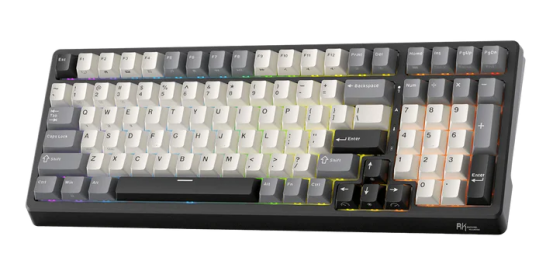
F99 96% Wireless Mechanical Keyboard
Ideal for late-night gaming sessions with friends—its silent switches let you game without disturbing others. This 96% layout keyboard features RGB lighting, a large-capacity battery, and RK’s customized silent switches. With ultra-low latency, it delivers responsive gaming performance while maintaining a quiet typing experience.
It also supports hot-swapping with other linear switches (e.g., Cream Linear, Beige Tactile), allowing you to customize your typing feel to your preference.
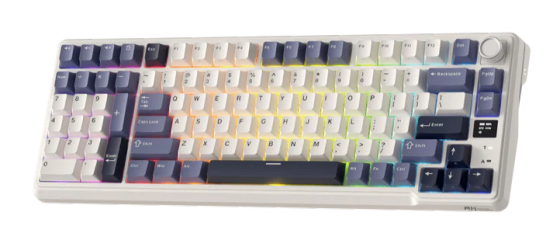
L98 96% Wireless Mechanical Keyboard (Left-Handed Design)
Specifically designed for left-handed users, this 98-key keyboard supports tri-mode wireless connectivity (Bluetooth, 2.4G, wired) and an 8000mAh large battery—providing long-lasting performance for extended gaming or work sessions.
Equipped with RK’s customized silent switches, it offers a satisfying typing feel with minimal noise. It also supports hot-swapping, so you can switch to other switch types if you prefer.
FAQ
Are silent switches suitable for typing?
Yes, silent switches are excellent for typing. They reduce noise while providing a comfortable, reliable typing experience. When choosing, consider your needs (e.g., noise level, tactile preference) and budget. Silent switches are especially beneficial in quiet environments like offices or libraries, or for late-night use. Importantly, many silent switches prioritize typing feel—such as the Sakura V3 Silent Switch—so you won’t sacrifice comfort for quietness.
Is a silent linear switch quieter than a silent tactile switch?
Yes, silent linear switches are generally quieter than silent tactile switches. Linear switches have no tactile bump—they glide smoothly from top to bottom, producing minimal noise during presses and rebounds. Silent tactile switches, on the other hand, have a subtle "click" or bump when pressed (designed to be quieter than standard tactile switches), but this feedback still makes them slightly louder than silent linear switches.